Key Takeaways
- ENCY 3.2 lets you store and reload complete toolsets, cutting set‑up time by up to 30 % on repeat jobs.
- The new drag‑and‑snap work‑holding UI removes manual coordinate entry, speeding fixture placement by ~25 %.
- Combo Finish now accepts a user‑defined scallop‑height limit (0.01–0.05 mm), giving programmers tighter control over surface finish without extra passes.
- Face‑Milling operations inherit work‑holding data, reducing the number of separate setup steps.
ENCY 3.2 Streamlines Tool‑Management
Re‑using Tooling Across Multiple Projects
When several parts are machined on the same CNC, recreating the same tool magazine layout can be a hidden productivity drain. ENCY 3.2 introduces an Assembly‑Mode “Tool Library” that captures every magazine pocket, adapter, and offset in a single file. The library can be imported into any subsequent job, eliminating repetitive manual entry.
- Typical savings: 4–6 minutes per part for a 12‑tool magazine.
- Impact: Up to a 30 % reduction in overall set‑up time for high‑mix production runs.
If a tool appears in multiple operations, any change to its magazine position or adapter offset propagates automatically. The refreshed Component Panel now displays a color‑coded map of occupied vs. free pockets, so users can verify tooling density at a glance instead of opening each operation.
Faster Work‑Holding Placement
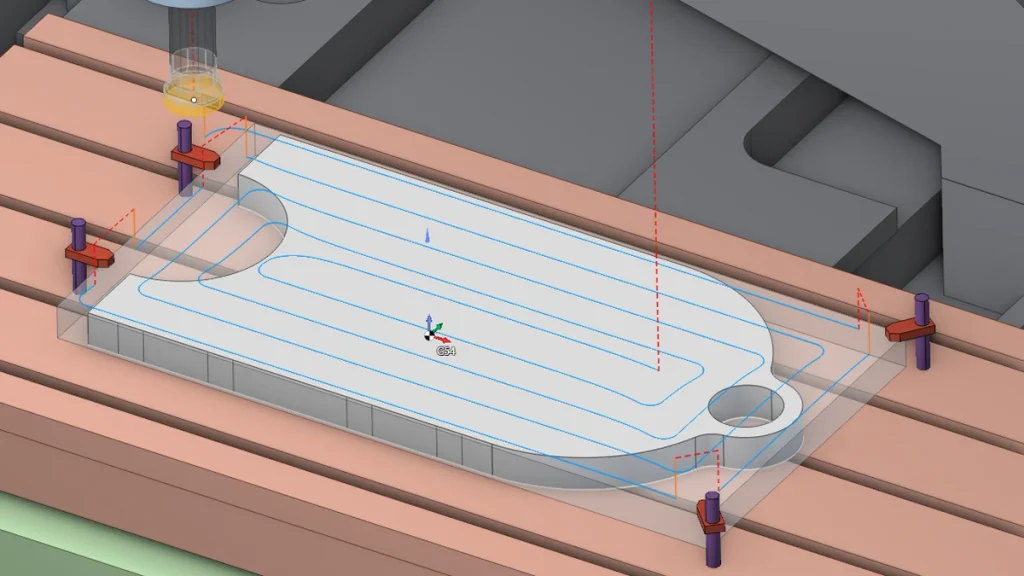
The updated UI replaces the old coordinate‑entry workflow with a drag‑and‑snap mechanism:
- Click a clamp icon.
- Drag it toward the stock, table, or fixture plate.
- ENCY highlights valid Z‑levels and automatically snaps the clamp into place.
This visual aid cuts the average fixture‑positioning steps from 5–7 clicks to 2–3, translating to roughly a 25 % time gain on complex setups.
Finishing Control Gets a Geometric Boost
Scallop‑Height‑Based Pass Spacing
Surface quality has traditionally been a trade‑off between pass spacing and cycle time. ENCY 3.2’s Combo Finish now accepts a maximum scallop height (default 0.025 mm, adjustable 0.01–0.05 mm). The post‑processor converts this limit into a mathematically optimal pass interval, ensuring the target roughness is met without unnecessary cuts.
Roughing Waterline Benefits
The Roughing Waterline strategy also leverages scallop height to calculate intermediate levels that follow the tool’s curvature. Shallow slopes receive finer steps, while steep sections keep spacing wider—maximizing material removal rates while preserving tool life.
Feature Comparison: ENCY 3.2 vs. ENCY 3.1
| Feature | ENCY 3.1 | ENCY 3.2 |
|---|---|---|
| Tool‑set reuse | Manual recreation per job | Save/load full magazine, auto‑propagation |
| Magazine view | List only | Color‑coded pocket map |
| Work‑holding placement | Coordinate entry required | Drag‑and‑snap with level highlights |
| Finish pass control | Fixed pass count | Scallop‑height limit (0.01‑0.05 mm) |
| Face‑Milling work‑holding | Separate step | Integrated work‑holding data |
| Estimated set‑up time reduction | – | 25‑30 % |
Practical Implications for Production Shops
- Reduced downtime: A typical 4‑axis shop running 150 parts/day can reclaim ~2 hours of machine availability per shift.
- Lower error risk: Automatic propagation of tool offsets removes the most common source of “wrong‑tool” crashes.
- Improved surface compliance: By defining scallop height, engineers can guarantee ISO 1302 surface texture grades (e.g., Ra 0.8 µm) without trial‑and‑error simulations.
Bottom Line
ENCY 3.2 delivers a tangible productivity lift by turning repetitive tooling tasks into a one‑click operation, simplifying fixture positioning, and granting programmers geometric control over finishing passes. For CNC shops focused on high‑mix, low‑volume production, the update can shave minutes off each set‑up and ensure consistent surface quality—making it a compelling upgrade over the previous release.


